
Anobii Reader1.3.2 - Google Play
You'll be able to see results in few seconds.
Publisher Description
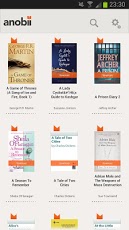
PLEASE NOTE: you need a free Anobii account to be able to use this app. Sign up free at www.anobii.comRead ebooks you're sure to love with the free Anobii Ebook Cloud Reader for your Android device. Visit our website (www.anobii.com) to find ebooks you’re sure to love by following interesting reading topics and recommendations created by our readers. Buy ebooks from a selection of tens of thousands top titles or download free ebooks (more than 35,000) to your Anobii library and get them instantly on the free Anobii Ebook Cloud Reader app for Android devices. The ebooks you get from Anobii can also be read on iPhone/iPad/iPod with our free app or on the most common ereaders (Sony, Kobo, etc) or on desktops. Our ebooks are sold with the Adobe DRM so you can enjoy them on any compatible device.You get more than ebooks with Anobii, you get a whole network of book readers and book lovers who can help you discover books you'll actually like to read. Our mission is to bring book lovers together and encourage reading by recommending great reads, and creating interesting reading topics so that all readers can find better books. Read your book anywhere you want and stay in sync across your devices. Features of the Anobii Ebook Reader: * Easily download and read ebooks from your Anobii library * Bookmark your place so you can pick up from the same spot again* You can synchronise your bookmarks across Anobii reader apps, so you won't lose your place if you switch devices * Highlight passages or make notes in a book * Share notes and highlights with other people reading the same ebook (optional) * Adjust font size for easier reading * Control the brightness of the screen and choose white or black backgrounds for day or night-time reading * Search within a book to find passages, terms or characters -- handy for revising and studying * View and navigate the table of contents and chapters in a book * Monitor your reading progress throughout the book * Tap or swipe right and left to turn pages forward and back through a book Download the free Anobii Ebook Cloud Reader app and tap into our community of book lovers. Discover a book you'll love on Anobii. Together, we find better books.
About Anobii Reader
The company that develops Anobii Reader is Anobii. The latest version released by its developer is 1.3.2.
To install Anobii Reader on your Android device, just click the green Continue To App button above to start the installation process. The app is listed on our website since 2013-01-29 and was downloaded 0 times. We have already checked if the download link is safe, however for your own protection we recommend that you scan the downloaded app with your antivirus. Your antivirus may detect the Anobii Reader as malware as malware if the download link to com.anobii.ereader is broken.
How to install Anobii Reader on your Android device:
- Click on the Continue To App button on our website. This will redirect you to Google Play.
- Once the Anobii Reader is shown in the Google Play listing of your Android device, you can start its download and installation. Tap on the Install button located below the search bar and to the right of the app icon.
- A pop-up window with the permissions required by Anobii Reader will be shown. Click on Accept to continue the process.
- Anobii Reader will be downloaded onto your device, displaying a progress. Once the download completes, the installation will start and you'll get a notification after the installation is finished.
Version History
version 1.3.2
posted on 2013-01-29
Several fixes and updates
version 1.3.2
posted on 2013-01-29
Disclaimer
Official Google Play Link
We do not host Anobii Reader on our servers. We did not scan it for viruses, adware, spyware or other type of malware. This app is hosted by Google and passed their terms and conditions to be listed there. We recommend caution when installing it.
The Google Play link for Anobii Reader is provided to you by apps112.com without any warranties, representations or guarantees of any kind, so access it at your own risk.
If you have questions regarding this particular app contact the publisher directly. For questions about the functionalities of apps112.com contact us.
